
The first two posts in this series tell a clean story. In Part 1, I fed my old Unity code to an AI agent and it rebuilt the app in a modern web framework. In Part 2, I drew an Illustrator mockup and the agent nailed a scaffold step it couldn't have designed on its own. Both times, the pattern was the same: provide rich domain context, get good output.
I was riding high. These models are incredible, I thought. I just give them my domain knowledge and they build.
This post is about what happened next. It's not as clean.
The Sweet Spot
To understand why this went wrong, you need to understand where I was as a developer when AI showed up.
In November 2020, two full years before ChatGPT was available to anyone, I started teaching myself Unity. I'm a math teacher. I'd been building physical manipulative boards for my students, and I wanted to digitize them. By the time ChatGPT launched in January 2023, I had a little over two years of self-taught C# under my belt.
That put me in a sweet spot that I didn't fully appreciate at the time. I knew enough about programming to steer the models. I could recognize when output was wrong, understand what good architecture felt like, read source code and reason about it. But I wasn't so advanced that I dismissed what the models could do. I didn't have twenty years of habits telling me how things "should" be built. I was curious enough to experiment, and novice enough to be amazed.
One of the first things I learned was that context changes everything. I was using JetBrains Rider at the time, and it was easy to navigate into the source code of whatever library I was using. When something didn't work, I'd copy the relevant source code and paste it into the conversation. The answers got dramatically better. I was doing context engineering before the term existed, before RAG was widely known, before anyone was talking about what to put in the context window. I was just a guy trying to make his code work, and I'd figured out that showing the model what I was looking at gave it what it needed.
That experience taught me something that has shaped everything since: the models are capable of extraordinary work, but only when you give them the right context. And knowing what context they need is the skill. Not prompting. Not "vibe coding." Understanding your own system well enough to know what the model is missing.
Why I Was Confident
By the time I started the quadratic factoring lab, I had reason to be confident. I'd built a C# Domain layer for MathTabla by hand, following proper domain-driven design. A ScaffoldPlan aggregate root that owns a linked list of ScaffoldStep records, each one encoding a complete perception-action learning loop: a StepGoal with semantic phrase roles, a StepAction expressed as a discriminated union with twenty-plus variants (SelectPhrase, DragToMatch, ClickPointAndEnterCoordinates), a StepCheck for validation, a StepFeedback hierarchy (Confirm, Hint, RevealStructure, NarrowAttention, WidenFocus), and a StepAttention type that models what the student sees, not just what they do.
Every record is immutable. I'd come up through mutation in Unity, learned to love immutability, and landed on discriminated unions as my favorite pattern. State changes return a new DomainOutcome<T>, either Accepted with a value or Rejected with domain errors. No exceptions for validation. No mutation. Pattern matching everywhere. When I moved to TypeScript, that was one of the things I loved about it: you could express the same kind of typed boundaries.
I built that Domain layer by hand because it encodes things an agent wouldn't know to encode. The six DiscoveryLabel values (goal, pattern, found, interpreted, step, context) aren't a generic feedback taxonomy. They're a teacher's vocabulary for what kinds of understanding a student retains after completing a step. The StepAttention type with VisibleSections, HiddenSections, and FocusRoles comes from watching a kid freeze because too much was on screen at once. An agent would give you showMessage and highlightElement. I gave it a vocabulary for pedagogical intent.
And it worked. Once the Domain layer existed as context, the agent could build out the infrastructure layer, the API, the data persistence, all flowing from those types. The domain model was the scaffolding, and the agent built within its boundaries beautifully. I knew that if I constructed the foundation, the agent could build from there.
Two wins. Domain context, design context. Both times, scaffolding in, good output out. So I moved to the next thing.
The Quadratic Factoring Lab
The next thing was significantly more complex than anything I'd built with an agent before.
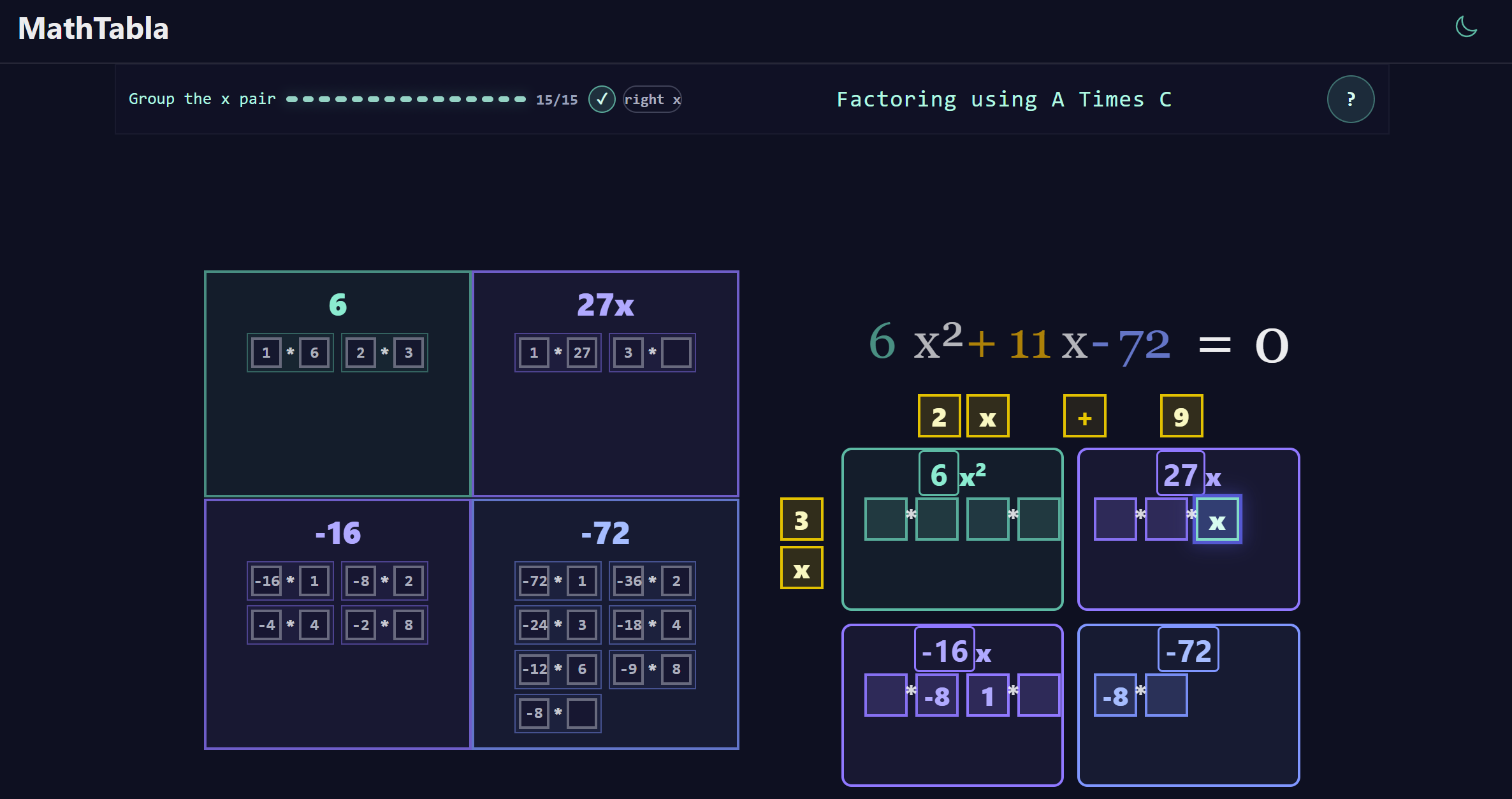
Quadratic factoring through the box method has six or more distinct interaction phases. The student builds the product A×C in a cross, brings in B, inspects factor pairs, splits the middle term, builds the box, decomposes cells, extracts shared factors, and reads the factorization. Each phase is a perception-action loop grounded in Perceptual Control Theory. And the whole thing lives in a single viewport with a camera metaphor: one persistent mathematical world where the focus shifts between steps instead of swapping screens.
This isn't a scaffold where you highlight a phrase and confirm a role. This is drag-and-drop with GSAP animations, state machine sequencing, CSS anchor positioning, invite pulses, modal flows with goal flyovers, factor pair panels with operator flip animations, all happening simultaneously and all interacting with each other.
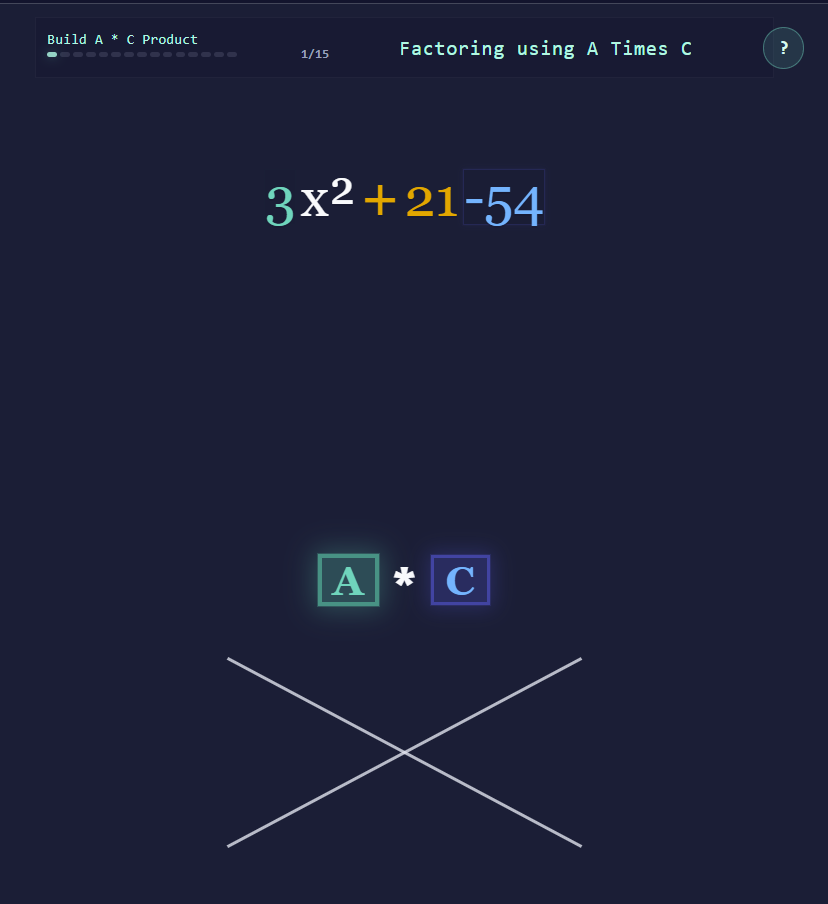
I'd done the design work in Figma. Grounded the interaction model in PCT. Measured the live app with Playwright. And here's where I made my mistake: I was learning Figma at the same time. I was investing my energy there because I believed, reasonably based on my previous wins, that if I gave the agent good Figma specs with CSS properties, it would handle the implementation. My attention was on the design tool, not on what the agent was producing in the codebase.
The Pretty Monolith
The agent built a working page. Drag and drop for placing A and C into the cross. GSAP animations for the product flyover. Factor pair panels. A split-B tray. Invite pulses. A guidance modal with goal flyover. It ran. It looked good.
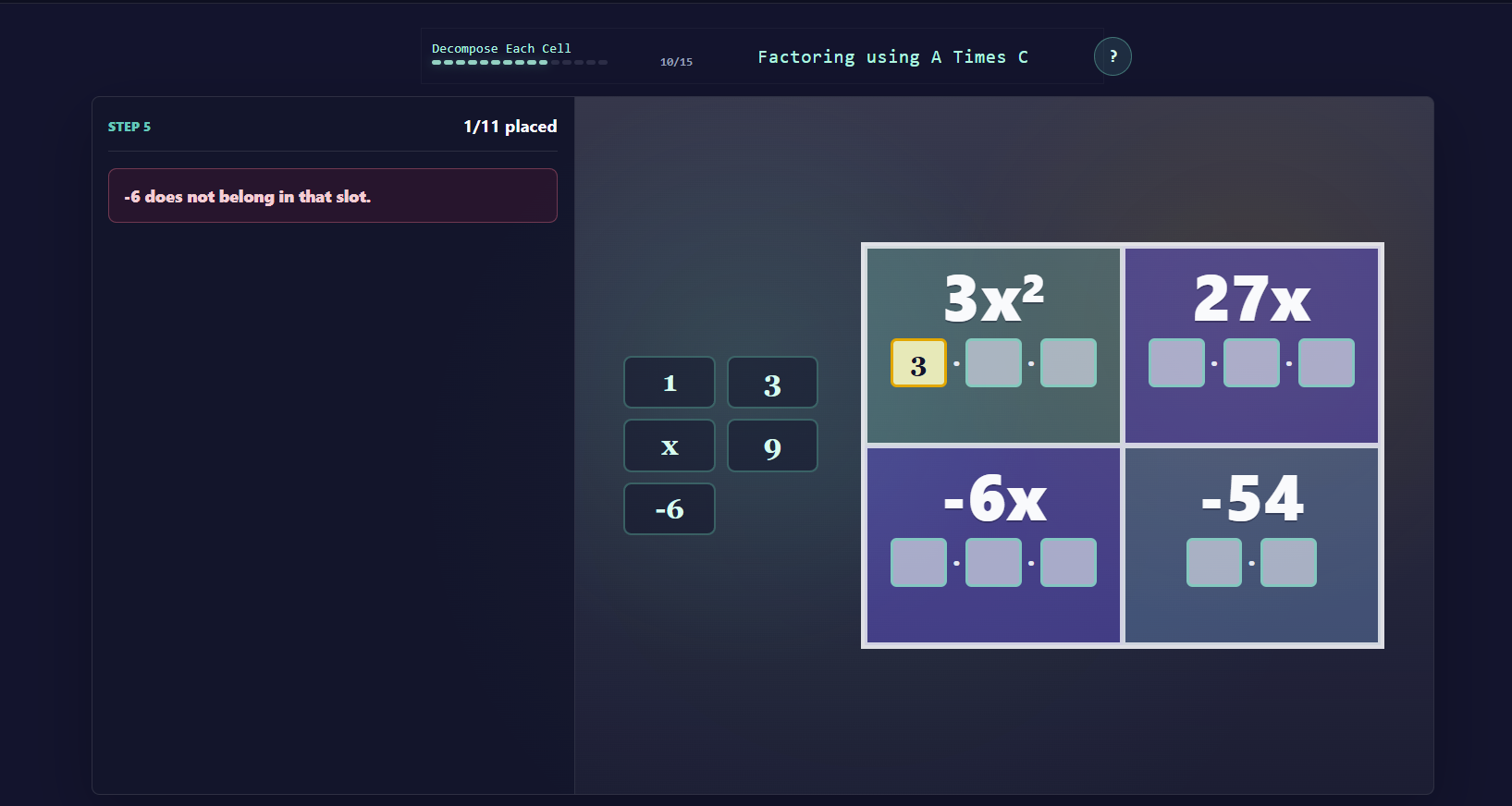
You wouldn't know anything was wrong from using it.
Then the bugs started. I'd try to fix one interaction and break another. I'd ask the agent to add a new feature and it couldn't figure out where to put it. Every change was a game of whack-a-mole across scattered reactive watchers and GSAP timelines that were all tangled together.
That's when I opened the code. One single-file Vue component. Over 1,000 lines of <script setup> before you even got to the template. Approximately 30 ref() declarations. Six separate drag-and-drop subsystems, each with its own start/end/drop boilerplate, each slightly different because they'd been written at different times as the page grew. GSAP timeline orchestration interleaved with reactive watchers. Invite pulse logic duplicated across five interaction points. A modal system. CSS anchor positioning. And roughly 1,000 more lines of scoped styles on top of all of it.
AI slop. But the kind that passes the eye test.
The Moment It Broke
I told the agent: this is a mess. 1,000 lines. We need to split this into components.
The agent agreed. It correctly diagnosed the problems: too many refs, duplicated patterns, interleaved concerns. Then it made the wrong move: it mechanically extracted the CSS into a separate file. Premature structural churn. Shuffling code without stopping to think about what the architecture should actually be.
We had tests. We had Figma specs. We had a whole design system. And instead of using any of that to inform the decomposition, the agent did a reflexive reorganization that made the code harder to reason about, not easier.
That was the pivot. Not because the agent failed, but because I recognized what I'd failed to provide. I'd scaffolded the domain. I'd scaffolded the design. I hadn't scaffolded the architecture.
On the backend, the C# Domain layer had given the agent structural boundaries naturally. Immutable records, discriminated unions, the DomainOutcome<T> pattern. Those types are architecture. The compiler enforces them. But Vue doesn't give you that for free. A single-file component will happily absorb 1,000 lines of refs, watchers, and GSAP handlers without complaining. There's no compiler saying "this file is doing too many things."
The discipline I'd applied on the backend had never been applied on the frontend. And I hadn't been watching because Figma had my attention.
Not My First Time
Here's the thing: I'd already been through this once before. The algebra tiles lab, the first complex manipulative I rebuilt for the web, hit the same wall. That one was so complex I'd created a separate prototype project to work through the architecture before integrating it back into the main app. And it worked. The prototype-then-extract pattern made the final version more manageable and allowed us to add features that would have been impossible in the original structure.
That earlier experience is what gave me the confidence this time to take the lead. I knew the monolith wasn't fixable by refactoring in place. I knew we needed to greenspace it. And I knew I needed to be the one defining the architecture, not the agent.
The Greenspace Rebuild
I didn't try to refactor the 1,000-line file. Refactoring a monolith with an AI agent is a trap. The agent doesn't have enough context to know which extractions are safe and which will break the interaction model. Instead, I greenspaced it.
The rule: keep the old page as a runnable behavior oracle. It passes the tests. It demonstrates the interactions. It's the spec. Build a brand-new route beside it with proper architecture. The new page only replaces the old one when it passes the same tests.
But this time, before writing a single component, I built the scaffolding the agent needed. The same discipline I'd applied in C#: types first, immutable contracts, impossible states unrepresentable. All of it brought forward into TypeScript and Vue.
Types First, Components Second
The first file in the greenspace wasn't a Vue component. It was quadratic-factoring.types.ts.
The old page had about 30 boolean refs tracking state: isAPlaced, isCPlaced, isBPlaced, isProductRevealed, isModalOpen, and on and on. Nothing connected them. Nothing prevented impossible combinations like isProductRevealed === true while isAPlaced === false.
The types file replaced all of that with discriminated unions:
// Before: 30 scattered boolean refs
const isAPlaced = ref(false)
const isCPlaced = ref(false)
const isBPlaced = ref(false)
const isProductRevealed = ref(false)
// ... 26 more

// After: one discriminated union
type QuadraticLabPhase =
  | 'intro'
  | 'entering-step-1'
  | 'build-ac'
  | 'revealing-ac-product'
  | 'bring-b-guidance'
  | 'entering-bring-b'
  | 'bring-b'
  | 'split-b'
  // ...
A single phase value replaces a combinatorial explosion of booleans. The type system makes impossible states unrepresentable. Every composable, every component, every test branches on one value instead of checking five flags. The agent can't drift because the types won't let it.
XState as the Single Source of Truth
In the old page, the state machine was a progress driver. It tracked which step the student was on and whether the modal was open. Everything else (which tokens were placed, which animations had run, which drag sources were active) lived in loose refs that the page managed directly.
In the greenspace, the XState machine owns all learning-loop state. Named events with product semantics:
type QuadraticEvent =
  | { type: 'START_LAB' }
  | { type: 'TRANSITION_DONE' }
  | { type: 'PLACE_A' }
  | { type: 'PLACE_C' }
  | { type: 'PLACE_B' }
  | { type: 'OPEN_GUIDANCE' }
The key design decision: a generic TRANSITION_DONE event whose meaning is derived from the current state. When the product flyover animation completes, it sends TRANSITION_DONE. The machine knows that in the revealing-ac-product state, that means "advance to bring-B guidance." The animation doesn't need to know what comes next.
This fixed a real bug from the old page: B became interactive the moment A and C were placed, before the product reveal animation finished and before the guidance modal appeared. In the greenspace, explicit phases gate every transition: revealing-ac-product (no interaction) → bring-b-guidance (modal, no interaction) → bring-b (B active). Impossible to skip.
Component Boundaries as Contracts
Each component was designed with a "what it does NOT do" rule. This is the part the agent needed most: not a description of what to build, but explicit boundaries on what each piece is forbidden from knowing about.
// QuadraticLabHud
// DOES: display phase label, step count, help button
// DOES NOT: know about XState, GSAP, drag/drop, CSS anchors
// CONTRACT: props in, 'open-help' event out

// ATimesCQuadraticCross
// DOES: render the cross shape, expose target element refs
// DOES NOT: know about XState, GSAP, drag logic
// CONTRACT: exposes aTargetEl, cTargetEl, bTargetEl as template refs

// QuadraticGuidanceModal
// DOES: display modal with goal text, media, primary action
// DOES NOT: know about the state machine or which step it's in
// CONTRACT: props (open, goal, mediaSrc), exposes goalEl for flyover
Every component got its own folder with co-located files:
ATimesCQuadraticCross/
  ATimesCQuadraticCross.vue
  ATimesCQuadraticCross.types.ts
  ATimesCQuadraticCross.module.css
  ATimesCQuadraticCross.contract.test.ts
Contract Tests That Break When You Rename Things
Here's the pattern that changed how I think about AI-assisted development.
The types file defines a const object mapping semantic names to CSS class names. The CSS module implements those classes. The Vue template consumes the contract through the types. And a contract test reads the CSS source file and asserts that every key in the types object exists as a selector:
it('has CSS selectors for every CrossParts class', () => {
  const source = readFileSync(
    new URL('./ATimesCQuadraticCross.module.css', globalThis._importMeta_.url),
    'utf8',
  )
  for (const className of Object.values(CrossParts)) {
    expect(source).toContain(`.${className}`)
  }
})
Three files form a contract: types, CSS, and template. The test enforces it. Rename .container to .wrapper in the CSS without updating the types? Test fails. Add a new key to CrossParts without adding the matching CSS class? Test fails.
Agents make exactly this kind of mistake. They rename things in one file and forget to update the others. The contract test turns a silent runtime bug into an immediate, loud failure. The agent gets the feedback it needs to self-correct.
Drag-and-Drop as a Layered System
The old page had five copies of the same drag/start/end/drop boilerplate, each slightly different. In the greenspace, drag-and-drop became a layered architecture:
Registry: stores source and target element refs by typed key. Pure data structure. Contract: a pure data mapping of which source goes to which target. Fully unit-testable. Hit Test: a pure function that returns the best match given bounding rects. No side effects. GSAP Drag: the only layer that touches the DOM. Attaches Draggable, evaluates hits on release, animates acceptance or rejection. Registration: the route-level coordinator that connects component-exposed refs to registry keys. Called once.
Each layer is independently testable. The contract is pure data. The hit test is a pure function. Only the GSAP layer needs a browser.
Locality: The Insight I Didn't Expect
The old codebase had a composables/lab/ folder. It was a dumping ground. Route-specific coordinators lived in a generic shared folder alongside unrelated composables. When the agent worked on the quadratic lab page, it couldn't see the related composables because they were in a distant folder, outside the context window.
The greenspace rule: if a composable is only used by one page, it lives next to that page.
pages/labs/quadratic-factoring-box-method/
├── index.vue
├── useQuadraticBoxMethodFlow.ts
├── useQuadraticGoalFlyover.ts
├── useQuadraticDragRegistry.ts
├── useQuadraticDragRegistration.ts
├── useQuadraticGsapDrag.ts
├── useQuadraticInvitePulses.ts
├── quadratic-invite-pulse.contract.ts
└── quadratic-drag-contract.ts
I deleted the old composables/lab/ folder entirely.
After I'd made this change, I listened to a podcast interview with Anders Hejlsberg, the creator of C#, TypeScript, and Turbo Pascal. He made two points that stopped me cold.
First: locality matters for AI because a source file with explicit imports and a clear external protocol is easier to summarize and reason about than code governed by hidden global state. That's exactly what I'd discovered. Nuxt's auto-import magic is convenient for humans, but it's hidden global state for the agent. The agent doesn't see an import statement, so it doesn't know the dependency exists. When I co-located everything and made dependencies explicit, the agent stopped losing track of things.
Second: language services and semantic search become critical agent infrastructure because text search cannot reliably distinguish symbols. My contract tests are a primitive version of this insight. They enforce that the semantic chain between types, CSS, and templates stays intact. A language server does this through understanding; my tests do it through assertion. Same principle.
I arrived at these conclusions by building a math manipulative with AI agents. Hejlsberg arrived at them from designing programming languages. The fact that we landed in the same place from opposite directions tells me these principles are real.
The Lesson
The 1,000-line component wasn't a code quality failure. It was a missing scaffolding failure.
On the backend, I'd given the agent structural boundaries without even thinking about it. C# records with discriminated unions are architecture, and the compiler enforces the boundaries. But on the frontend, I gave the agent domain knowledge and visual specs without any structural scaffolding for the code itself. A Vue single-file component doesn't push back. It absorbs everything you throw at it. And when I wasn't watching, because I was learning Figma, the agent filled the only container that existed.
The greenspace worked because I brought the same discipline forward from C# into TypeScript: types first, immutable contracts, impossible states unrepresentable, and everything co-located so the agent's context window captures the full picture.
It's the same thing that happens with students. If you give a student a worksheet with one big blank space, they'll put everything in that space. If you give them a worksheet with labeled sections and constraints, they'll organize their thinking. The container shapes the work. That's true whether the builder is a ninth grader learning factoring or an AI agent implementing a drag-and-drop system.
Scaffold the domain. Scaffold the design. And scaffold the architecture. Miss any one of those three and you'll end up with a working monolith that passes the eye test and falls apart the moment you try to change it.
What the Sweet Spot Taught Me
I started this post talking about the sweet spot: knowing enough to steer the AI but not so much that I dismissed it. Three years in, I think the sweet spot has shifted. It's no longer about how much programming you know. It's about how well you understand the difference between what the AI can design and what it can only implement.
The Domain layer? That's something I had to design. The pedagogical taxonomy, the attention model, the feedback hierarchy. Those come from years in a classroom, not from training data. The greenspace architecture? That's something I had to design too. The component boundaries, the contract tests, the locality rules. Those come from hitting the wall and recognizing what was missing.
But everything between those two layers (the infrastructure, the API wiring, the individual component implementations, the GSAP animation timelines, the drag-and-drop mechanics) the agent built all of that. And it built it well, once I gave it the right boundaries.
Senior engineers often fight the tool because it doesn't do things their way. Junior developers accept whatever it produces. The people who get the most out of AI-assisted development are the ones who can tell the difference between the parts that need human judgment and the parts that need machine speed. That's not a skill level. It's a kind of awareness.
I learned it by accident, because I happened to be two years into self-taught programming when the models arrived, and I was curious enough to paste source code into ChatGPT before anyone told me I should. But it's learnable. And the first step is understanding that the AI isn't replacing your skills. It's waiting for you to tell it where the boundaries are.
The Series
This is the third post in a series about AI-assisted development on a real product.
Part 1: Context Engineering, covering how I got here, from physical boards to Unity to web apps, and why your old code is the best context you've ever had.
Part 2: AI Isn't Killing Designers, exploring how Illustrator mockups gave the AI visual context it couldn't generate from training data.
Part 3 (this post), covering what happens when you scaffold domain and design but not architecture, and the patterns that fixed it.
You can see the lab in progress at mathtabla.com/student-demo.