
Every generation has its version of this panic. Socrates thought writing would destroy memory. He genuinely believed that if people wrote things down, they'd stop exercising their minds, and human thinking would get weaker. Plato recorded those arguments. In writing. And nobody today would say that writing made humanity dumber. It just changed where the skill went.
Teachers in 2005 said Wikipedia would kill research. People now say AI is going to replace designers and programmers. The pattern is always the same. A new tool shows up, people assume it replaces the skill, and then it turns out it just changes where the skill matters most.
A couple weeks ago, Claude got design tools and suddenly "design is dead" again. I think that's funny. Because my whole journey is proof that design skills don't die when new tools show up. They become the foundation for the next thing.
I'm Not a Designer. But I Design Everything.
I wouldn't call myself a designer. I use design tools a lot, but I'm not the guy obsessing over aesthetics. What I do obsess over is whether a student can look at something and understand it. Which details need to be visible? Where should their eye go first? What should be interactive versus what should just be there for reference?
Before I was a programmer, I taught myself Illustrator to create the physical manipulative boards I used in my math classroom. Then I used those same skills to make better handouts for my students. Then I realized I could import my Illustrator assets into Unity with drag and drop, and that's what pulled me into programming in the first place.
Design was my gateway to code. Not the other way around.
That's the skill I bring to Illustrator. Not making things beautiful. Making things learnable. And it turns out that's exactly the kind of context AI can't generate on its own.
The Problem with AI and Learning
Here's the irony. LLMs are literally about learning. Machine learning. But they have almost no real-world data on how people actually learn. When you're trying to build a UI over very specific, granular domain knowledge, like helping a student extract data points from a word problem and map them to slope-intercept form, that's out-of-distribution data. The AI has never seen it.
The AI's instinct is to add. More labels, more color, more animation. My instinct is to remove. One of the things I do is blur text that isn't relevant to the current step. Not hide it, just push it out of focus so the student's eye goes where it needs to go. Negative space. Not emptiness, but intentional removal to increase attention.
That's not something the AI suggests. It's never seen training data where the right answer is "show less." But if you've watched a student freeze in front of a screen with twenty steps and six panels, you know that the problem isn't missing information. It's too much information at the wrong time.
What the AI Built First
I was building a scaffold step where the student confirms that a mapped formula matches slope-intercept form. The student has just dragged four meaning labels into place: total cost = cost per ticket times tickets plus flat fee. Now they need to recognize that structure as y = mx + b before moving on to extract actual numbers.
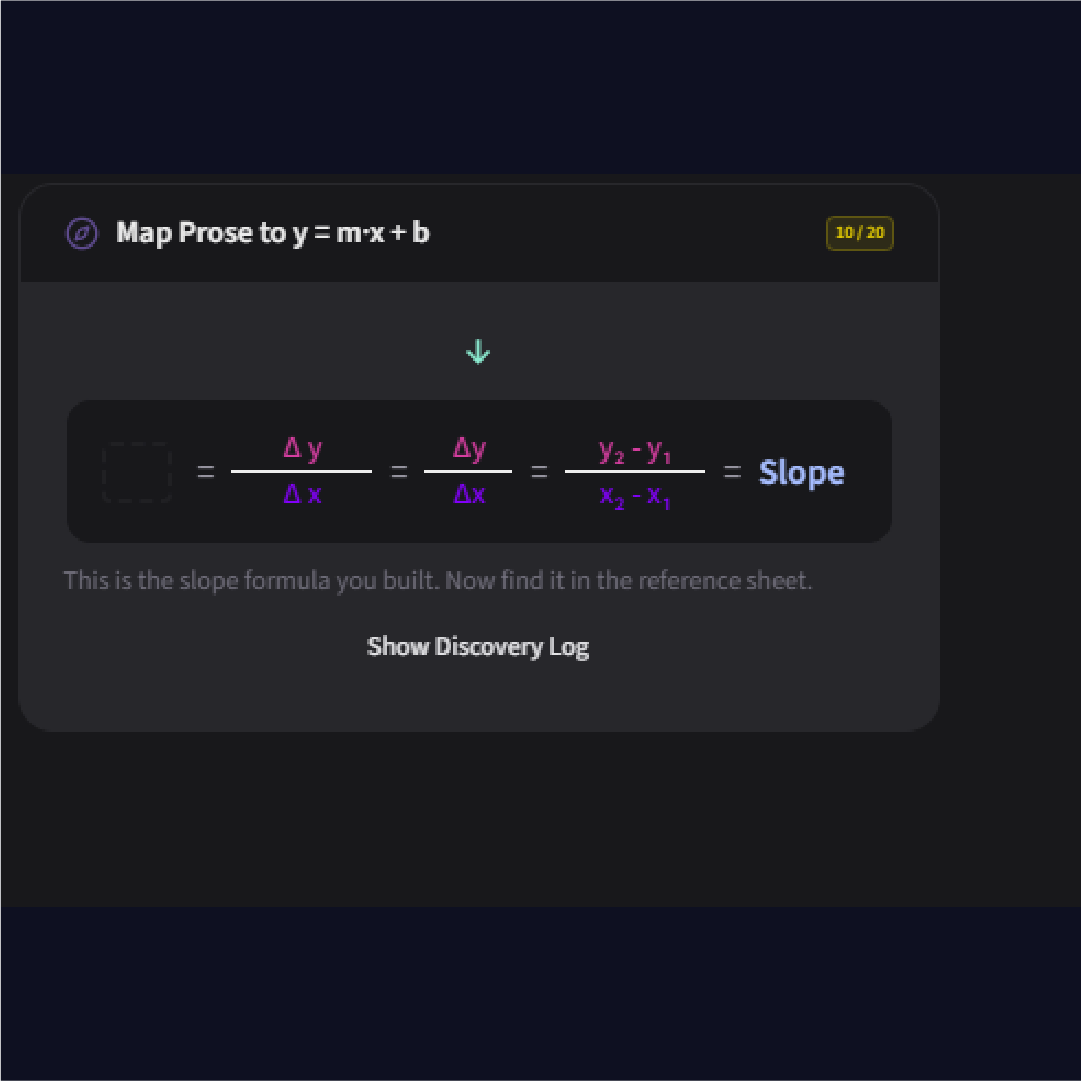
The first attempt jumped ahead. Instead of a confirmation moment, it showed the slope formula with delta y over delta x. Wrong step entirely. It skipped the pause and went straight to calculation.
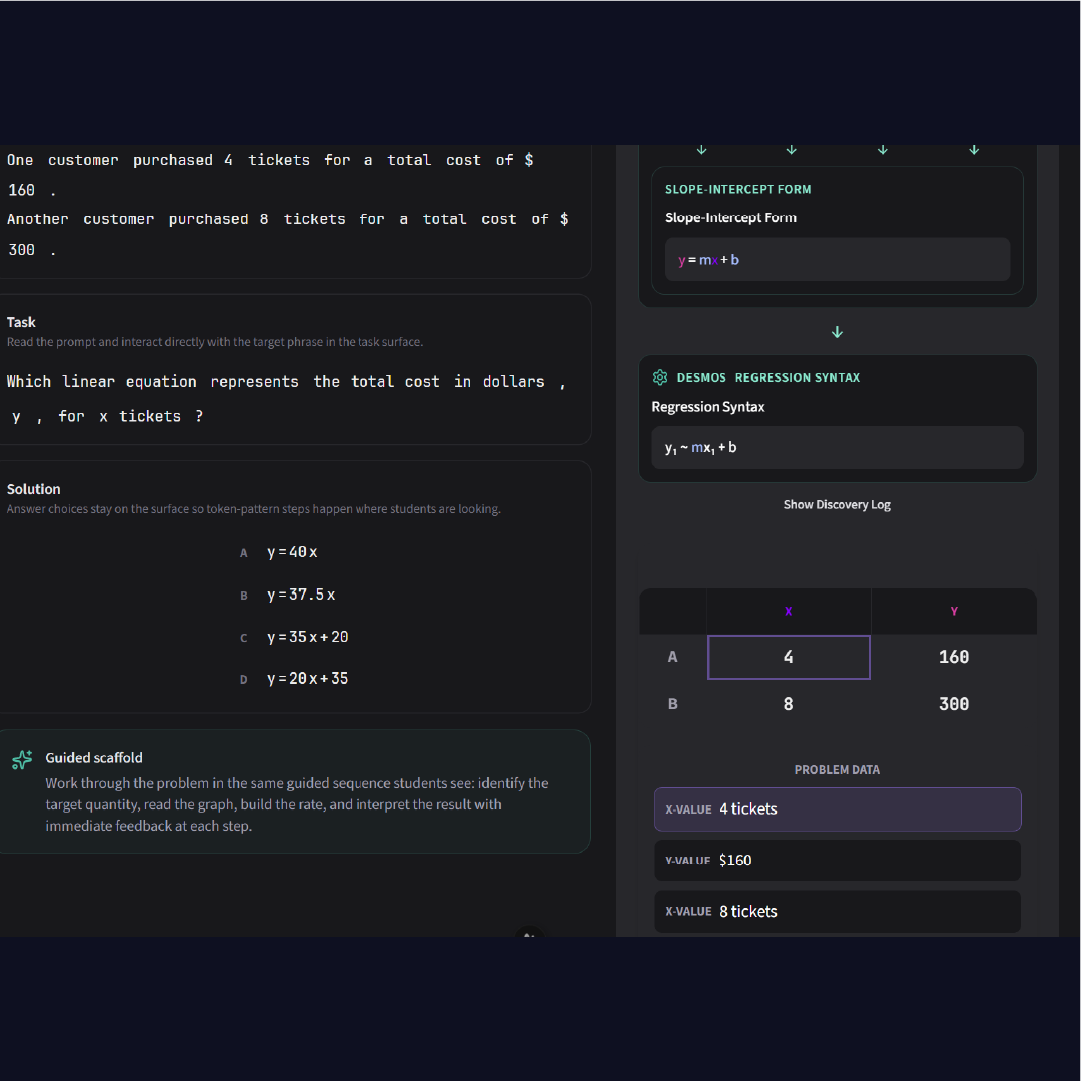
The second attempt was closer. It had the right semantic roles in the discovery log. But the layout still wasn't what I needed. The visual flow between the mapped formula and the abstract form wasn't there. The student wouldn't see the connection between "total cost = cost per ticket times tickets plus flat fee" and "y = mx + b" because they weren't visually linked.
I could describe what I wanted in words. I tried. But there's a limit to how precisely you can specify spatial layout, interaction states, and animation flow in a paragraph.
The Mockup
So I opened Illustrator and drew it.
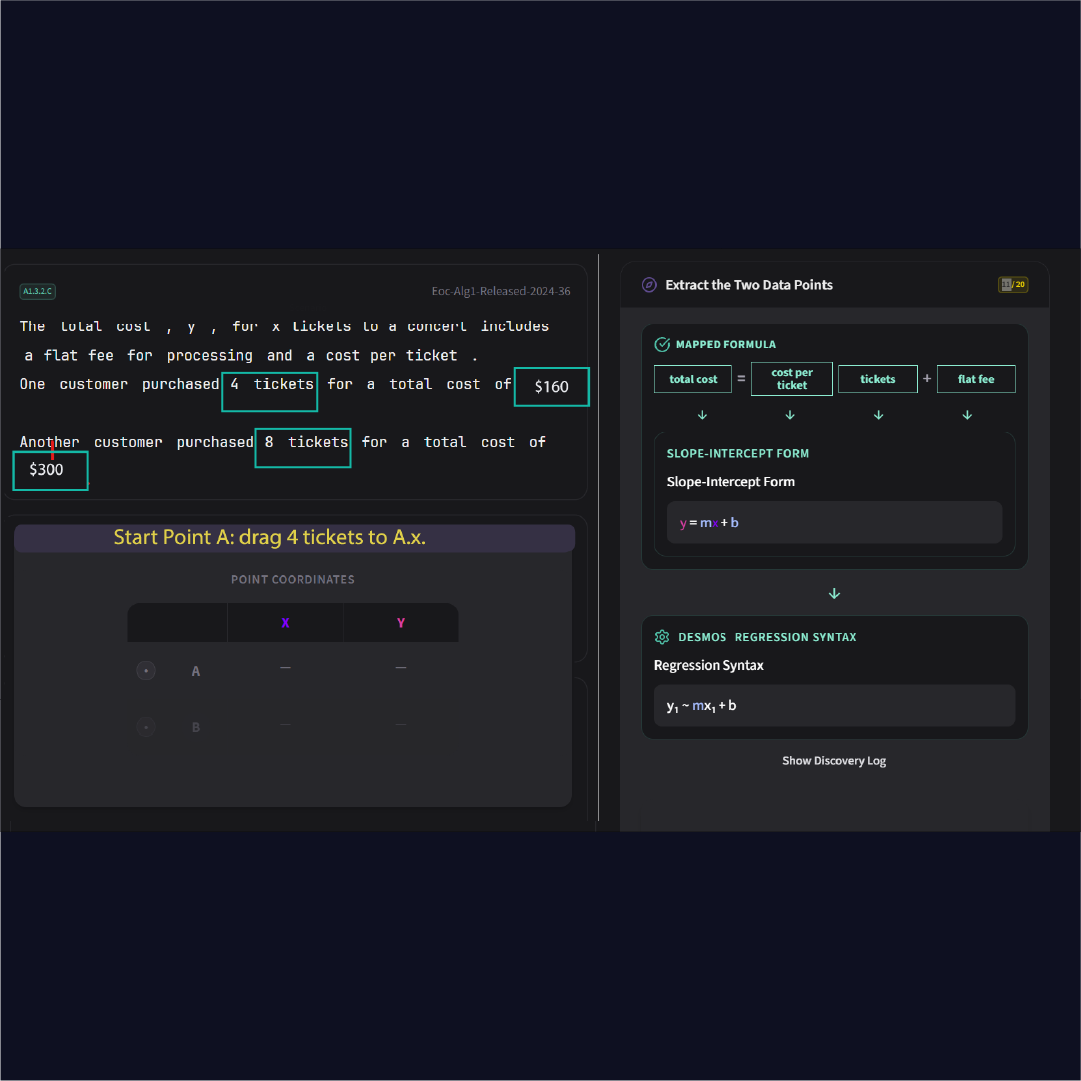
Not a polished design. A visual spec. I showed the mapped formula on the left with the slot labels (y slot, m slot, x slot, b slot). I showed the arrows flowing down into the abstract slope-intercept form. I showed the flyover animation carrying the completed structure from the left panel into the right panel's discovery log. I showed where the "Click the completed mapped formula" instruction goes. I showed where Continue appears.
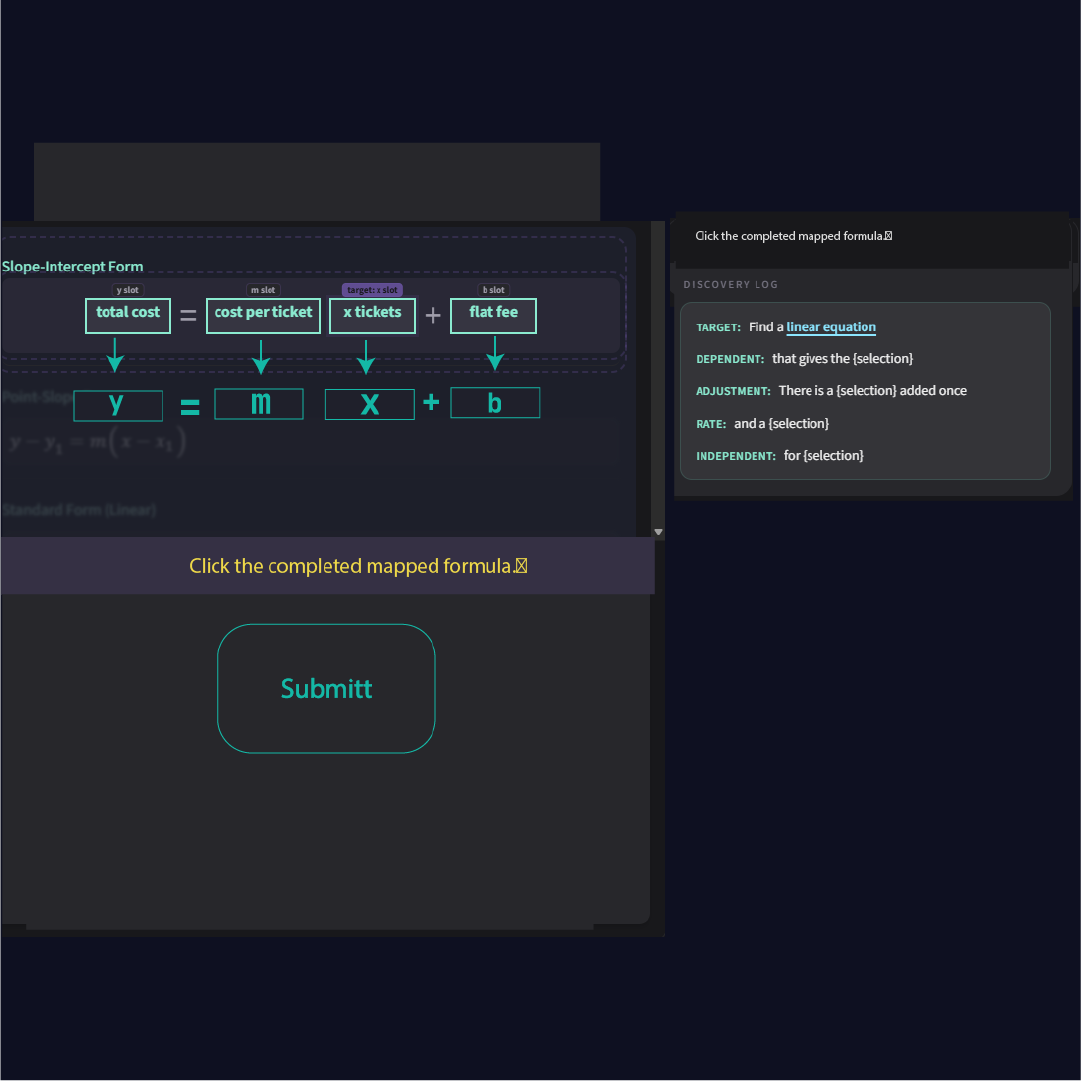
One image communicated what three paragraphs of description couldn't: the spatial relationship between the concrete (total cost, cost per ticket) and the abstract (y, m, x, b). The direction of the visual flow. The checkpoint moment where everything collapses into the discovery log before the student moves on.
That's not aesthetic skill. That's knowing what a student needs to see, and being able to draw it.
What the AI Built After
Two sessions. Four rounds of iteration. The AI nailed it.



The final version has the problem text on the left with the reference sheet open to slope-intercept form. The mapped formula sits at the top with arrows flowing down to y, m, x, b. On the right, the operative zone shows the full scaffold pipeline: mapped formula, slope-intercept form, Desmos regression syntax, all flowing down in sequence. Step 10 of 20, and everything is where it should be.
The difference between the first attempt and the final version wasn't better prompting. It was better context. The Illustrator mockup gave the AI something it could never produce from its training data alone: a visual encoding of pedagogical intent.
The Key Insight
If you want your model to produce outputs that are outside of its training distribution, you need to provide scaffolding.
The same word. The same concept.
I scaffold students so they can reach beyond what they can do alone. I scaffold the AI with mockups, specs, and domain knowledge so it can produce things outside its training data. The skill is the same. The audience is different.
And here's the thing about scaffolding: it works both ways. Once you've done enough iterations, the AI starts picking up the pattern. It starts contributing ideas closer to what you want. But it can't get there without that initial scaffolding from you. Someone has to show it what "good" looks like in this specific domain first.
That's not AI replacing designers. That's AI waiting for someone who knows what the output should look like.
You want AI to produce something it's never seen before? Scaffold it. The same way you'd scaffold a student. Show it what good looks like. Give it the structure. Then let it build.
Try It Yourself
You can see the scaffold in action at mathtabla.com/student-demo. Pick a topic and walk through it. Every step was designed this way: mockup, iterate, refine.
And if you missed the first post in this series, Context Engineering: What AI-Assisted Development Actually Looks Like covers how I got here, from physical boards to Unity to web apps, and why the old code was the best context I ever had.